Perfect Living OS · For service businesses

You do great work.
Make room for more.

The last job is finished. Dinner is on the table. But you are still answering messages, finding tomorrow’s address and remembering which invoice you haven’t sent.

Perfect Living OS brings customers, quotes, schedules and invoices together—so running a cleaning, handyman or property-service business doesn’t have to mean carrying every detail yourself.

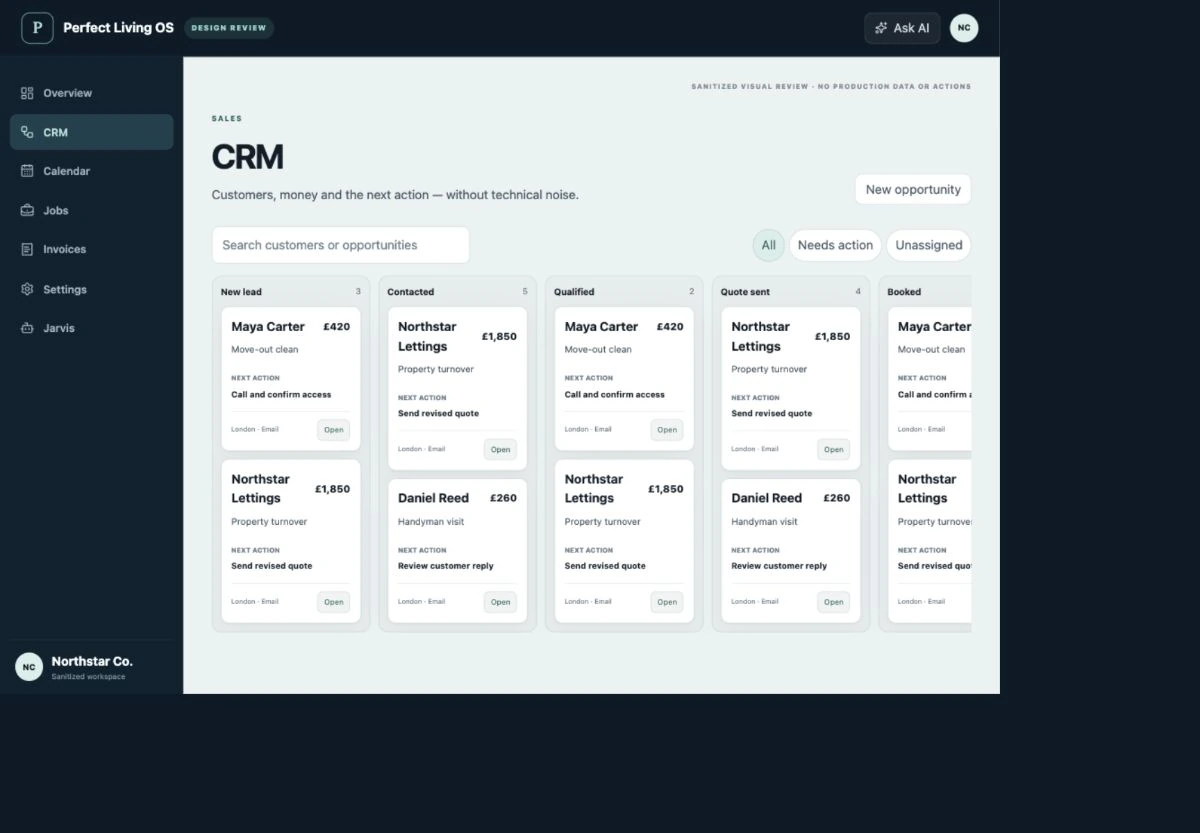
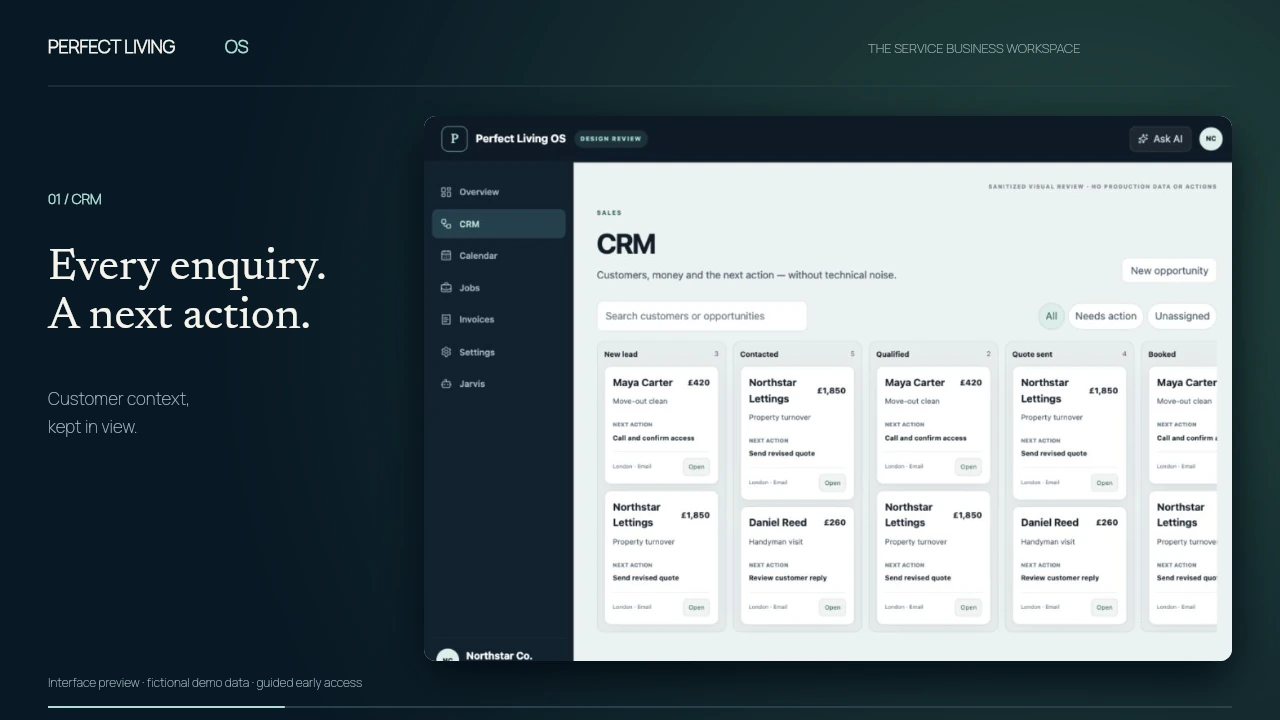
Perfect Living OS product film: CRM with fictional demo records.
Interface preview · fictional demo dataCRM → Calendar → Jobs → Invoices
Read the film description

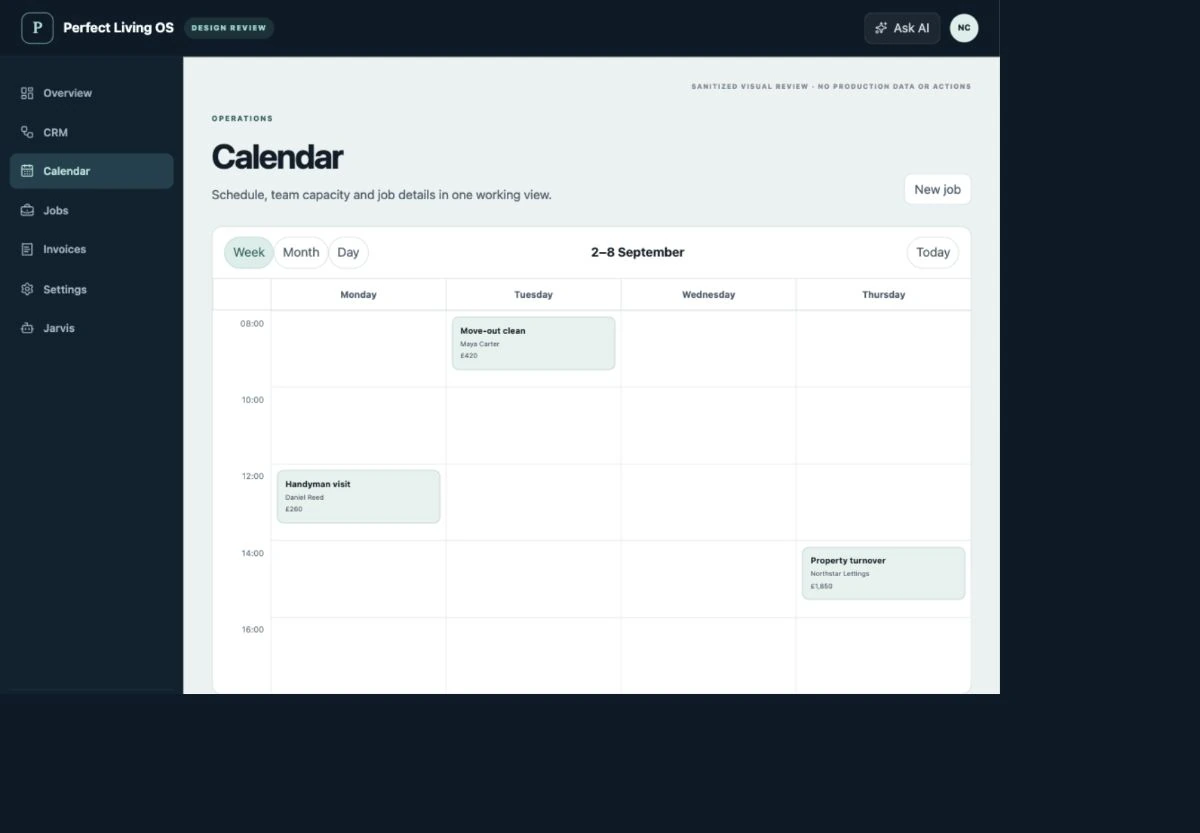
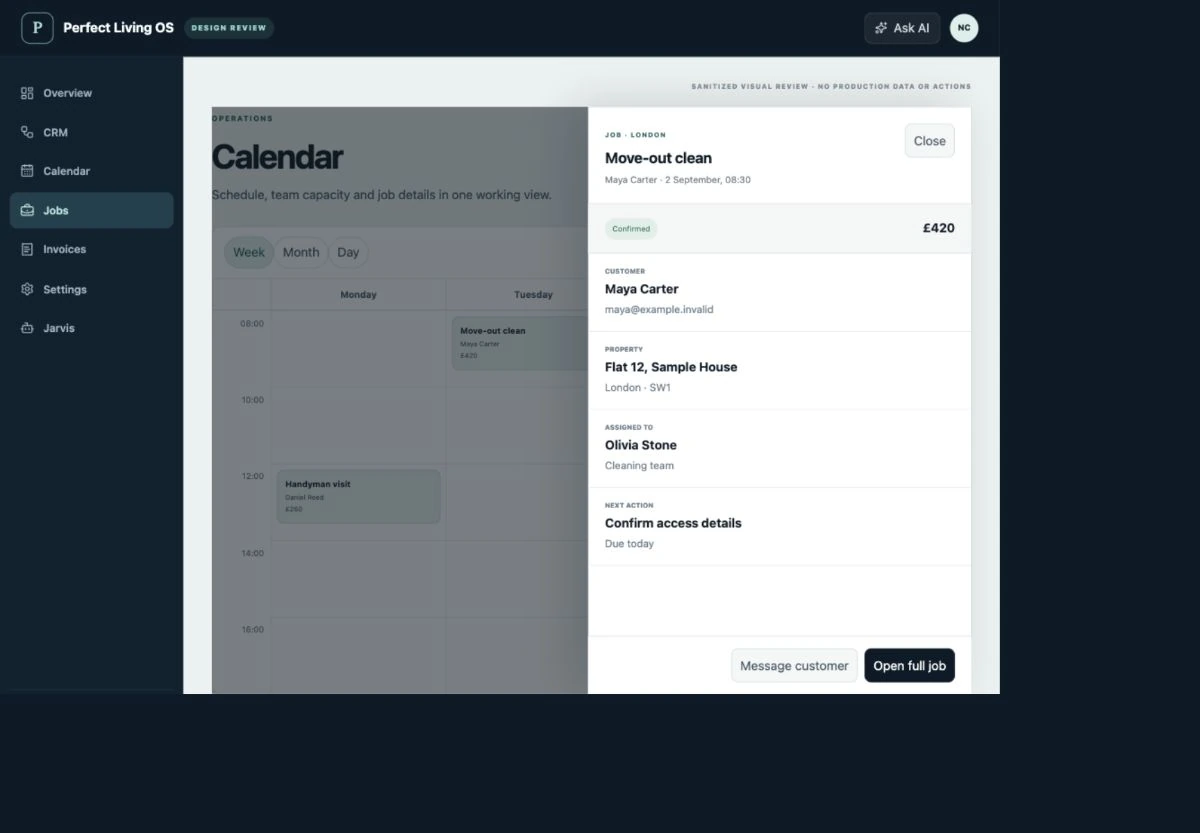
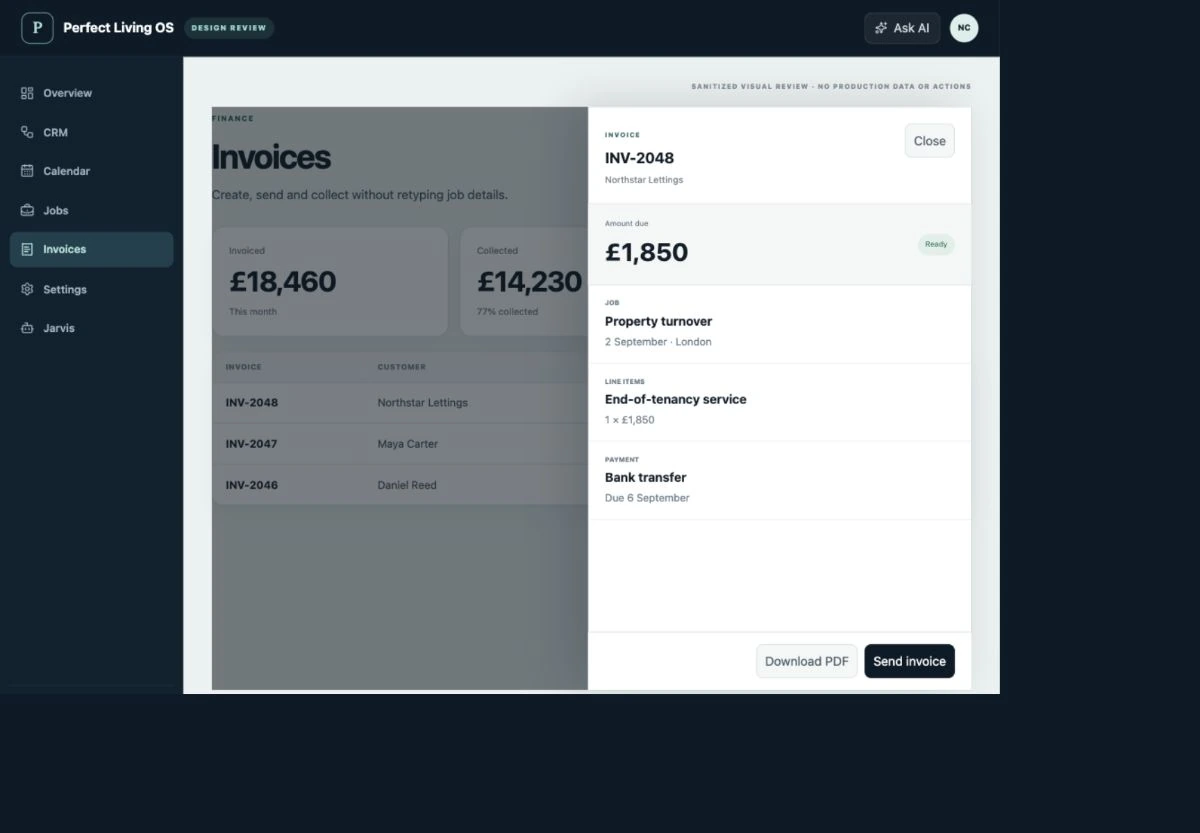
A little less chasing. A clearer working day. The film moves through four screens from the Perfect Living OS demo workspace: a CRM board with enquiries and next actions; a weekly calendar; a job brief with a customer, sample address and assigned person; and an invoice with its line item and due date. It closes with “Keep the whole picture” and an invitation to explore guided early access. All names and commercial figures are fictional. This is an interface preview, not a recording of a live customer workflow.

A good business can outgrow its inbox

You didn’t start a company to chase your own team.

The quote is in an email. The address is in a chat. The appointment is in someone’s calendar. And the customer is asking you for an update.

None of those tools is necessarily bad. The trouble is the space between them: the detail that never reached the person doing the job, the follow-up nobody owned, the invoice still waiting after the work was finished.

Perfect Living OS is designed to keep the customer and the work connected. So the next step does not depend on the owner remembering everything.

Built for the work you actually do

Different services.
The same need for a clearer day.

The current focus: businesses that send people to properties, organise work and look after customers over time.

Illustrative scene of a cleaning operations lead briefing a colleague at a bright modern property.
01 / Cleaning companies
01

Cleaning companies

The clean repeats. The admin shouldn’t.

A weekly home clean, an office rota and an end-of-tenancy handover are three different promises. Keep the customer, property, recurring visits and team brief together, so each visit starts with the right information.

Recurring visits · Property instructions · Team schedules

Illustrative scene of a craftsman reviewing his next job at an organised workshop bench.
02 / Handyman & maintenance teams
02

Handyman & maintenance teams

A better brief before anyone picks up the tools.

“A few small repairs” can mean an hour’s work or a very different job. Bring the photographs, scope, quote and appointment into the same customer story. Give the person attending something more useful than an address.

Scope & photographs · Quotes · Job records

Illustrative scene of a property manager and maintenance specialist reviewing an apartment at handover.
03 / Property service businesses
03

Property service businesses

More properties. Less detective work.

The landlord pays. The tenant needs an appointment. The contractor needs access. Organise the people and the property together, with a visible next action instead of another round of “who is dealing with this?”

Property history · Visit coordination · Clear responsibility

Illustrative scene of a facilities supervisor and maintenance colleague discussing work during an office atrium walk-through.
04 / Commercial service teams
04

Commercial service teams

Keep the promise across every site.

Office cleaning and planned maintenance need continuity: the agreed scope, visit pattern, site instructions and commercial record. Give the office a way to follow the work without asking each person for a separate update.

Site instructions · Planned work · Invoices & follow-up

Illustrative scenes and scenarios, not customer case studies. Your workflows and integrations should be confirmed before subscribing. Talk us through your business ↗

See what changes

Less chasing.
More time for the work.

Your customers, schedule, team and invoices — connected around the job. Take a closer look at the OS, then explore the moments it is designed to make simpler.

01 / CRM & customer history

Remember the customer. Not just the last message.

A better conversation starts before you pick up the phone.

“Yes, I can see the photographs you sent.” A small sentence that makes a customer feel remembered. Keep their details, property and previous conversations together, so whoever answers can pick up the story—not ask them to start again.

Explore a working example

A landlord calls about the flat you worked on last month. Your colleague took the booking. The tenant sent the photographs. The invoice went to somebody else. Before you can answer a simple question, you are asking three people what happened.

  • Keep the customer, property and work history in context.
  • Read the information already collected before asking another question.
  • Give the next action an owner instead of leaving it in an inbox.

For a property-service company, the person arranging access may not be the person paying. Keeping those responsibilities clear is more useful than collecting another contact with no context.

Perfect Living OSCRM
Perfect Living OS demo: Customer history and enquiry stages. Fictional records.
Customer history and enquiry stages · Demo workspace

02 / Calendar & recurring visits

A full calendar should still make sense.

Book the day you can deliver, not the day you hope will happen.

A regular customer wants to move Thursday’s clean. Before you say yes, see the visits and people already assigned. Find a time that works, check the practical details and give an answer you can stand behind. A busy week feels different when you can see it clearly.

Explore a working example

One customer needs to move Thursday. Another would like an extra visit. Your regular work is already booked, and the person who knows this property is away. The empty square on the calendar is only part of the answer.

  • Review one-off visits alongside recurring work.
  • See who is assigned before promising a slot.
  • Keep the agreed appointment connected to the customer and job.

For a cleaning company, moving one regular visit should not mean losing sight of the next one. The schedule helps the office explain what is possible instead of saying yes and working it out later.

Perfect Living OSCalendar
Perfect Living OS demo: Weekly visits and team assignments. Fictional records.
Weekly visits and team assignments · Demo workspace

03 / Jobs & team coordination

Send a proper brief. Not another forwarded message.

The person doing the work should not need the owner’s memory.

The team arrives knowing which door to use and what the customer expects. If something changes, there is an agreement to check and a place to record the next step. Your customer sees people who are prepared. Your phone gets to stay in your pocket a little longer.

Explore a working example

The team is outside. The customer is in a meeting. The useful access note is somewhere in yesterday’s conversation, and the office phone has started ringing again. This is not a difficult job. It is a missing detail.

  • Put the practical instructions with the work they relate to.
  • Keep extra requests distinct from the original scope.
  • Record what happened and what still needs attention.

At a rental handover, cleaning may be finished while a repair is still outstanding. Separate job records and clear responsibility help the property manager understand what is ready and what is not.

Perfect Living OSJobs
Perfect Living OS demo: Customer, scope and job instructions. Fictional records.
Customer, scope and job instructions · Demo workspace

04 / Invoices & payment status

Finished work is not the same as money received.

Close the work properly. Then close the financial loop.

The work is done. The details should not need typing out from memory at nine that night. Keep the invoice with the job, see what still needs attention and check payment before calling it settled. Less detective work between finishing a job and closing it properly.

Explore a working example

Friday looks productive: the team completed the visits, the customer was happy and the keys were returned. But the invoice is still waiting to be sent. Meanwhile, a different bill has been sent twice because nobody checked its status.

  • Review the work and agreed charges before preparing an invoice.
  • See which invoices still need attention.
  • Confirm payment evidence before treating an amount as received.

For a commercial service team, a completed site visit, an issued invoice and a settled balance are three different milestones. Keeping them separate makes a customer query easier to resolve.

Perfect Living OSInvoices
Perfect Living OS demo: Invoice line items and payment status. Fictional records.
Invoice line items and payment status · Demo workspace

The details around the job

Keep the conversation moving.

Clear quotes, connected conversations, a customer-facing view and help with the admin.

Quotes & agreed scope

Turn “roughly how much?” into a clear decision.

Keep the proposed work, options and exclusions alongside the customer record. Your team can check what has been discussed and what still needs an answer before committing. When the work changes, the original agreement gives everyone a starting point for the conversation.

“Just a couple of things” arrives with six photographs. There is a loose handle, a damaged wall and a shelf still in its packaging. A single number is easy to send. A quote both sides understand takes a little more care.

  • Describe the work clearly rather than relying on a message thread.
  • Keep questions about access, materials and scope with the quote.
  • Check the agreed scope again when preparing the job brief.
Conversations & follow-up

Keep the thread, even when somebody else replies.

Supported communication connections bring useful conversation context closer to the customer record. The next person can review the information, understand the open question and take responsibility for the reply. Which channels can be connected, and what history is available, depends on the provider and your setup.

The first enquiry came by email. The appointment was discussed on the phone. Now the customer wants an update and the person who spoke to them yesterday is not at their desk.

  • Review the available conversation before replying.
  • Keep the unanswered question connected to a next action.
  • Confirm channels, provider charges and connection requirements during setup.
Customer portal

Give customers their side of the story.

The customer portal provides a customer-facing view of relevant quotes, visits, invoices and requests. Clients get the information that belongs to them; internal notes and private operating details stay on your side. Confirm the exact portal workflow your company needs before moving customers over.

“Can you send that over again?” is a reasonable question. So is “When are you coming?” Each interruption is small. Together, they can consume the part of the day you meant to spend growing the business.

  • Keep relevant customer-facing information accessible.
  • Separate the customer view from internal operational notes.
  • Walk through a real customer journey during onboarding.
AI assistance

Less starting from a blank page.

AI can help summarise conversations, prepare drafts and suggest next actions within configured permissions. It is useful for the preparation around a decision, not as an excuse to invent a price, promise availability or settle a complaint without authority.

There are twelve messages in the thread and one question left to answer. You could read them all again. Or start with a summary, check the important details and spend your time making the decision.

  • Prepare a first draft for the team to review.
  • Summarise the available context and identify missing information.
  • Keep sensitive decisions and uncertain situations with an authorised person.

Screens contain fictional demo records. Working examples are illustrative, not customer testimonials. Confirm plan features and integrations for your business.

One day inside a service business

The day won’t stop.
You can stop carrying it alone.

Imagine a small property-service company with regular cleaning customers, one-off repairs and a team out on the road. Four familiar moments. A clearer way through each one.

Illustrative scenes and workflows, not customer case studies. Available features and connections depend on your setup.

08:10 / Customer & enquiry

The first enquiry arrives before the first coffee.

A property manager needs an end-of-tenancy clean before Friday. There are photographs, a deadline and a question about the oven. You are already on the phone to somebody else.

How OS helps in this moment

Open the enquiry in the CRM. Keep the property, request and next action together. AI can help summarise the message and prepare a reply; your team checks the details before making a promise.

The conversation has somewhere to live—even when you are not the person answering it.

Illustrative scene of a service business owner reviewing the morning job notes at home.
08:10 / Customer & enquiry · Illustrative scene

10:35 / Schedule & people

Tuesday has changed. The rest of the week hasn’t.

A regular customer asks to move their clean. A new booking looks tempting, but the team cannot be in two places at once. Guessing now means apologising later.

How OS helps in this moment

Review the calendar, the existing visits and the assigned people. Find a workable slot, agree it with the customer and update the appointment. Availability still needs checking; a request is not a confirmed booking.

You make the decision with the day in front of you, not with three calendars in your head.

13:20 / Job brief & agreed scope

“Could you do the inside of the oven as well?”

The team has arrived. The access instructions matter. So does the scope: the customer mentions an extra task, and nobody wants a surprise on the invoice.

How OS helps in this moment

Use the job brief to check what was agreed. Record the extra request and get the necessary approval before changing the work or the price. Keep the notes and outcome with the same job.

The person at the property and the person in the office work from the same agreement.

Illustrative scene of a maintenance professional and coordinator reviewing a brief beside a service van.
13:20 / Job brief & agreed scope · Illustrative scene

17:40 / Invoice & next action

The work is finished. Don’t let the admin start again.

The team is heading home. One invoice still needs sending, another is waiting for payment, and one customer has a question. “All done” means something different in each case.

How OS helps in this moment

Review the completed work, prepare the invoice and keep outstanding actions visible. Check the payment evidence before marking an invoice paid. An unresolved issue stays with a responsible person.

You end the day knowing what is complete, what is owed and what tomorrow needs—not starting a fresh search through your messages.

Illustrative scene of two property-service colleagues reviewing the day in their office.
17:40 / Invoice & next action · Illustrative scene

The real benefit is not that the day has no surprises.

It is that every surprise has somewhere to go.

A record. A decision. A person responsible. That is the business behind the work.

Show us your working day ↗

For the people behind the work

One business.
Different things to get done.

The owner needs to know where to step in. The office needs to organise the next visit. The customer needs a clear answer. Their views should support those different jobs without losing the shared customer story.

01For the owner

Where do I need to step in?

See the unresolved work and decisions that need your attention, without reconstructing every conversation.

02For the office

Who is doing what today?

Follow the visits, assigned people, customer commitments and the next action on each job.

03For the customer

What happens next?

A customer-facing view of relevant quotes, scheduled work, invoices and requests.

A useful assistant, not another boss

Less rereading.
A clearer next step.

A long conversation needs a summary. A new enquiry needs a reply. An unfinished job needs somebody’s attention. AI helps prepare and organise the information; your team stays responsible for the decisions.

01

Catch up quickly

A customer has sent a long thread. Start with a summary of what they need, then check the important details.

02

Find the right words

You know what to say but not how to start. Let AI prepare a reply you can review and make your own.

03

Keep things moving

An enquiry needs a question answered. A job needs a follow-up. See a suggested next step instead of another loose end.

04

Stay in charge

The assistant helps with the preparation. Your people still decide what to promise and when to step in.

Helpful by design

An extra pair of hands.
Not someone making promises for you.

Welcome the next enquiryPublic AI Reception can answer from approved information and collect the details your team needs to follow up. It does not agree prices or resolve complaints for you.

Skip the blank pageStart a reply with a draft. Catch up with a summary. Check it, add your judgement and keep your own voice.

Decide what needs youChoose what the assistant may help with and what your team must review. Access follows each person’s permissions.

Keep the important calls humanA refund, an uncertain job or a safety concern needs the right person—not a confident guess from software.

Why it matters

A business that needs your judgement.
Not your memory for everything.

01

Make room for the next customer

When the last conversation is easy to find, your team can spend less time piecing it together and more time answering the next enquiry.

02

Look organised because you are

A clear quote. A team that knows the brief. An invoice that matches the agreement. Customers experience the difference in the small things.

03

Let your team take the next step

The person covering for you can see the job and the open question. You do not have to be the answer to every “what happens now?”

04

Know where the day stands

Finished, waiting, still to invoice: different situations need different actions. See what needs attention before it follows you home.

Why we are building it

The job is rarely the only job.

You can be brilliant at the work and still spend your evening chasing it. The keys. The photographs. The customer who asked for one more thing. The quote you meant to send yesterday.

That is the part of service work Perfect Living OS is built around. Not just putting an appointment in a calendar, but keeping the customer’s story with it: what they asked for, what you agreed, who is going and what happens afterwards.

A cleaner can leave a home spotless and still have an unanswered invoice question waiting at the office. A good repair can be followed by a confusing handover. We are building around that less visible work: the information, responsibility and communication that make a professional service feel professional from beginning to end.

The next chapter · Future direction

Local businesses deserve
a bigger way to think.

Today, our focus is property services. Next, we want to bring the same clarity to businesses where a good day depends on people, appointments and returning customers.

Editorial concept of a barber preparing a chair in a contemporary barbershop.
Barbershops & salons / Future direction · Illustrative scene
Editorial concept of a barista preparing coffee in an independent café.
Cafés & coffee shops / Future direction · Illustrative scene
01 / Exploring

Barbershops & salons

A full diary is only part of a good business.

We want to bring the same connected approach to appointments, practitioner availability, customer preferences and return visits. Chair-based scheduling, deposits and no-show handling need their own purpose-built workflows.

02 / Exploring

Cafés & coffee shops

The business continues behind the counter.

Our direction is to connect the people, daily routines, maintenance and customer relationships behind a local café. Point-of-sale, stock, recipes and food-service requirements need specialist work; this is not a café POS available today.

03 / Exploring

Other appointment-led businesses

A familiar customer. A business that remembers.

Beauty studios and other local service teams share the challenge of coordinating people, time and repeat customers. We plan to explore dedicated workflows rather than ask every industry to fit a property-service template.

Direction, not a delivery promise. These industry editions are not available today. Features, priorities and release dates are not committed; choosing a current plan does not include a promise of future functionality.

Tell us about your industry ↗

Getting started

Bring your business. Keep what works.

Start with your customers, team and daily schedule. Agree what needs to move, what should stay connected and how to prove the new setup before changing the whole operation.

01

Tell us about a normal Tuesday

Where do enquiries arrive? Who books the work? What keeps you at your desk after the team has gone home? Start there.

02

Make it feel like your business

Set up your services, people and everyday steps. Agree who can see information and who can make changes.

03

Bring the customers you know

Decide which records to move and which tools you still need. Check the information before your team depends on it.

04

Try one job from start to finish

Follow an enquiry through the quote, visit and invoice with a small team. Find the awkward bits before everyone changes over.

05

Move when your team is ready

Make sure the office and customers know what to expect. Broaden the rollout once the important steps work for your business.

Start small. Check your data, team access and customer journey before moving the whole business.

Find the right starting point

A plan for your team.
Clarity before commitment.

Basic · Team · Operations. See current prices, allowances and availability in the OS plan catalogue ↗.

One written order form. It identifies the contracting entity, users, data scope, fees, renewal and support boundary.

Published protections. Read the OS Early Access Terms, refund and cancellation policy and Privacy Notice.

Perfect Living OS questions

Clear before early access.

What type of business is Perfect Living OS designed for?

The current early-access product is designed around cleaning, handyman, maintenance and property-service businesses that manage leads, quotes, scheduled work, invoices and customer communication.

Does Perfect Living OS replace every existing tool?

Not automatically. The right setup depends on workflow, integrations and migration risk. The OS is intended to become the owned operating record, while selected email, phone, payment, accounting or specialist systems may remain connected.

Is the AI fully autonomous?

No. AI can classify, draft, summarise and recommend inside configured permissions. High-impact, uncertain, financial, legal, safety-related or unresolved decisions remain visible for human review.

What can customers see?

The customer portal is designed to show the relevant customer-facing record — such as quotes, visits, invoices and requests — without exposing internal notes, private business data or Owner systems.

Can existing customer data be migrated?

Migration is part of guided onboarding. The useful records, fields, history and ownership rules are mapped before data is imported; the aim is a controlled operating record, not a blind transfer of every legacy field.

How do integrations work?

The appropriate connection depends on the company and the system involved. External email, phone, payment, accounting and other providers have their own terms and technical limits, so integrations are confirmed during onboarding rather than promised universally.

Where can I see prices and availability?

The OS plan catalogue holds the current Basic, Team and Operations prices, allowances and registration status. Follow Explore plans to check the latest information. This presentation does not activate payments or change your subscription.

Can I use it for a barbershop or café now?

Those are future product directions, not available industry editions. No release date or feature commitment is being announced. Tell us how your business works if you would like to contribute to the requirements.

Can an organisation cancel?

Cancellation, renewal, data export and any refund position are stated in the order form and the published OS Early Access Terms and Cancellations, Refunds & Service Remedies policy, subject to mandatory law.

How do I get started?

Review the current OS catalogue, then confirm your essential workflows, team size and integrations. Registration and purchase availability are shown in the OS itself. Plan a controlled changeover rather than moving your entire operation at once.

Perfect Living OS

Your team does the work.
Give them the whole picture.

Explore the product, check the plans, or show us the part of your working day that needs to get simpler.

Explore OS plans Discuss your business ↗Check current availability in the OS catalogue. OS terms · Cancellation & refunds · Privacy